

Description
Download Trello Desktop App – Chrome Apps, Trello, Desktop App, Productivity Tool
Overview
The Trello Desktop App offers a standalone solution for accessing Trello’s collaborative task management platform directly from your computer. Designed for users who rely on Trello’s Kanban board system for organizing projects, this application provides a seamless way to manage workflows without depending on a web browser. The app is ideal for professionals, remote teams, and individuals seeking a more integrated experience with Trello’s visual project tracking features.
By running as a native desktop application, it aims to enhance productivity by reducing browser overhead and enabling quicker access to boards, cards, and team collaboration tools. The software supports real-time updates and integrates with Trello’s existing ecosystem, allowing users to maintain consistent workflows across devices. It is particularly beneficial for users who spend significant time managing multiple projects and need a lightweight yet efficient interface.
Developed by Trello, Inc., the app leverages the company’s established expertise in digital task management and team collaboration. Although the developer did not provide additional details about its internal architecture or development roadmap, the app’s alignment with Trello’s core functionality suggests a focus on usability and reliability. The application is suitable for use in both personal and professional environments, including remote work setups, creative teams, and agile development cycles.
Key Features & Capabilities
- Standalone Desktop Integration – The app functions as a dedicated desktop client, allowing users to launch Trello without opening a browser tab. This reduces startup time and streamlines access to frequently used boards.
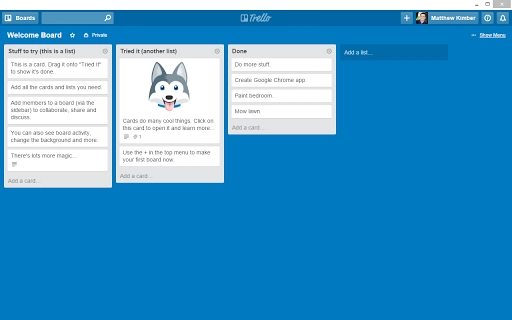
- Kanban Board Management – Full support for creating, editing, and organizing cards, lists, and boards using Trello’s signature visual layout. Users can drag and drop items, assign due dates, and attach files directly within the app.
- Real-Time Sync – Changes made in the desktop app are synchronized instantly with the Trello web service and other connected devices, ensuring all team members have access to up-to-date information.
- Offline Mode (Limited) – While not fully offline-capable, the app retains recent board states and allows basic interactions during temporary connectivity loss, with changes synced once reconnected.
- Notification Center Integration – The app integrates with system-level notification systems on Windows and Mac, delivering timely alerts for card mentions, due dates, and activity updates.
These features support efficient task tracking in fast-paced environments. For example, a project manager can quickly update a task’s status from the desktop app while attending a meeting, without switching between browser windows. Similarly, a remote team member can receive instant alerts about board changes, improving responsiveness and collaboration.
User Interface, Workflow & Performance
The user interface of the Trello Desktop App follows the clean, minimalist design language of the Trello web platform, ensuring consistency across platforms. The layout is divided into a sidebar for board navigation, a central workspace for board views, and a top menu for account and settings access. Navigation is intuitive, with clear visual cues and minimal clutter, making it accessible even for new users.
Workflow efficiency is enhanced by direct access to core actions such as creating new cards, adding checklists, and assigning team members. The app supports keyboard shortcuts and mouse gestures, allowing experienced users to perform tasks rapidly. However, the developer did not specify resource usage details, so performance may vary depending on system configuration and the number of active boards.
Stability appears to be a priority, as the app is built on a robust foundation used by Trello’s web service. General software behavior patterns suggest reliable operation under normal conditions. The app does not appear to consume excessive CPU or RAM during idle periods, though exact metrics were not provided. Users are advised to monitor system performance during extended use, especially when managing multiple large boards.
Compatibility & System Requirements
The Trello Desktop App is compatible with both Windows and Mac operating systems, making it accessible to a broad user base. The application is available in version 1.0.0 and has a download size of 100MB, which is relatively lightweight for a desktop productivity tool. This size suggests a streamlined installation process with minimal disk space requirements.
Exact system requirements were not listed by the developer. While the app is expected to function on modern machines with standard configurations, users should ensure their systems meet general desktop application standards. The developer did not provide information on minimum processor speed, RAM, or graphics support, so compatibility may vary across older or low-end devices.
Pros and Cons
Pros
- Seamless integration with the Trello web platform
- Lightweight installation at 100MB
- Fast access to boards without browser dependency
- Real-time synchronization across devices
- System notification integration for timely alerts
Cons
- Offline functionality is limited and not fully supported
- Exact system requirements were not specified
- May require additional setup for advanced Trello features
- Dependent on Trello’s cloud infrastructure
- No built-in backup or export tools within the app
FAQ Section
Is the Trello Desktop App free to use?
Yes, the app is available at no cost. It is designed to complement the free tier of Trello’s service, offering enhanced access without additional charges.
Does the app work offline?
The app supports limited offline functionality. Users can view recently accessed boards and make minor edits, but changes are only synced once an internet connection is restored.
How often does the app update?
Updates are released automatically when new versions are available through Trello’s distribution channels. The current version is 1.0.0, with future updates managed by the developer.
Is the app secure?
The app uses secure connections to communicate with Trello’s servers. It does not store sensitive data locally beyond what is necessary for temporary synchronization.
Can I use the app on both Windows and Mac?
Yes, the Trello Desktop App is available for both Windows and Mac operating systems, allowing cross-platform use.
Final Thoughts + CTA
The Trello Desktop App delivers a focused, efficient way to access one of the most popular task management platforms. Its lightweight design, real-time sync, and seamless integration with the Trello ecosystem make it a valuable tool for anyone managing projects through Kanban boards. While offline capabilities are limited and system requirements are unspecified, the app remains a reliable choice for users who value speed and consistency.
It is especially beneficial for remote workers, agile teams, and individuals who rely on Trello for daily productivity. With its free access and straightforward setup, the app enhances workflow efficiency without complexity.
Download Trello Desktop App now
Guides & Tutorials for Trello App App for Chrome
How to install Trello App App for Chrome
- Click the Preview / Download button above.
- Once redirected, accept the terms and click Install.
- Wait for the Trello App App for Chrome download to finish on your device.
How to use Trello App App for Chrome
This software is primarily used for its core features described above. Open the app after installation to explore its capabilities.
User Reviews for Trello App App for Chrome 0
No reviews found





